Development
Empower VCF Operations Orchestrator API integration with HttpRestClient

The HTTP-REST plugin in VCF Operations Orchestrator represents API endpoints as RestHosts in the inventory. After defining a RestHost, you can authenticate and send HTTP requests such as GET and POST to its endpoint.
HttpRestClient handles common request tasks, including content types, errors and retries.
HttpRestClient provides these features:
- Supports GET, POST, PUT, PATCH, DELETE and HEAD.
- Retries failed connections with a configurable delay. Defaults are 5 attempts and 10 seconds between attempts.
- Accepts expected response codes, with defaults for each method.
- Can retry on a 500 status code. This is enabled by default.
- Handles application/x-www-form-urlencoded content automatically.
- Accepts an Accept-Type header, which defaults to application/json.
- Accepts a Content-Type header, which defaults to Accept-Type.
- Encodes URIs and URI components automatically, detecting existing encoding.
- Obfuscates secrets in logged content when they match password/secret/refreshToken.
HttpRestClient provides shared request handling between Orchestrator and API endpoints. It is designed to integrate with or extend any API service.
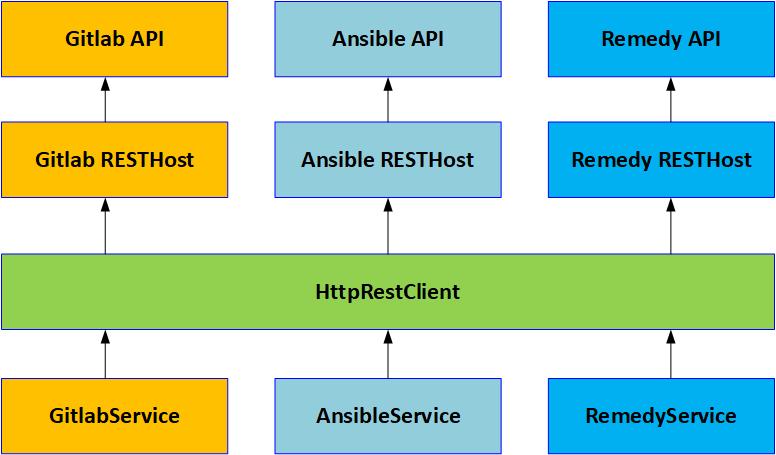
You can download my HttpRestClient module as a package here or as native JS here.
Use HttpRestClient
Import HttpRestClient into an action or workflow using one of these approaches:
As a variable:
var rest = new (System.getModule("com.simplygeek.rest").HttpRestClient())(restHost);As an object property:
this.rest = new (System.getModule("com.simplygeek.rest").HttpRestClient())(restHost);Alternatively, extend the class using classical inheritance:
    var HttpRestClient = System.getModule(
        "com.simplygeek.rest"
    ).HttpRestClient();

    ApiService.prototype = Object.create(
        HttpRestClient.prototype
    );
ApiService.prototype.constructor = ApiService;Parameters:
| Name | Type | Description |
|---|---|---|
| restHost | REST:RESTHost | The HTTP-REST RESTHost (either from the Inventory or transient) |
| retryMaxAttempts | Number | OPTIONAL – The max number of times to retry the connection (defaults to 5) |
| retryDelay | Number | OPTIONAL – The number of seconds between retries (defaults to 10) |
| retryOn500 | Boolean | OPTIONAL – Whether to retry on a 500 status code (defaults to true) |
The code creates an HttpRestClient instance in rest. Use this variable for API calls, or rename it if needed.
Supported methods
Use one of the following methods to make an API call:
GET
rest.httpGet(uri, acceptType, expectedResponseCodes, headers) → {*}
Parameters:
| Name | Type | Description |
|---|---|---|
| uri | String | The request uri |
| acceptType | String | OPTIONAL – The Accept-Type media type (defaults to application/json) |
| expectedResponseCodes | Array/Number | OPTIONAL – A list of expected response codes (defaults to [200, 201, 204]) |
| headers | Array/String | OPTIONAL – A key/value set of headers to include in the request |
Returns the request response object.
POST
rest.httpPost(uri, acceptType, content, contentType, expectedResponseCodes, headers) → {*}
Parameters:
| Name | Type | Description |
|---|---|---|
| uri | String | The request uri |
| acceptType | String | OPTIONAL – The Accept-Type media type (defaults to application/json) |
| content | Object | OPTIONAL – The request content (stringifies the payload when sent, defaults to {}) |
| contentType | String | OPTIONAL – The Content-Type media type (defaults to application/json) |
| expectedResponseCodes | Array/Number | OPTIONAL – A list of expected response codes (defaults to [200, 201, 204]) |
| headers | Array/String | OPTIONAL – A key/value set of headers to include in the request |
Returns the request response object.
PUT
rest.httpPut(uri, acceptType, content, contentType, expectedResponseCodes, headers) → {*}
Parameters:
| Name | Type | Description |
|---|---|---|
| uri | String | The request uri |
| acceptType | String | OPTIONAL – The Accept-Type media type (defaults to application/json) |
| content | Object | The request content (stringifies the payload when sent) |
| contentType | String | OPTIONAL – The Content-Type media type (defaults to application/json) |
| expectedResponseCodes | Array/Number | OPTIONAL – A list of expected response codes (defaults to [200, 201, 204]) |
| headers | Array/String | OPTIONAL – A key/value set of headers to include in the request |
Returns the request response object.
PATCH
rest.httpPatch(uri, acceptType, content, contentType, expectedResponseCodes, headers) → {*}
Parameters:
| Name | Type | Description |
|---|---|---|
| uri | String | The request uri |
| acceptType | String | OPTIONAL – The Accept-Type media type (defaults to application/json) |
| content | Object | The request content (stringifies the payload when sent) |
| contentType | String | OPTIONAL – The Content-Type media type (defaults to application/json) |
| expectedResponseCodes | Array/Number | OPTIONAL – A list of expected response codes (defaults to [200, 201, 204]) |
| headers | Array/String | OPTIONAL – A key/value set of headers to include in the request |
Returns the request response object.
DELETE
rest.httpDelete(uri, acceptType, expectedResponseCodes, headers) → {*}
Parameters:
| Name | Type | Description |
|---|---|---|
| uri | String | The request uri |
| acceptType | String | OPTIONAL – The Accept-Type media type (defaults to application/json) |
| expectedResponseCodes | Array/Number | OPTIONAL – A list of expected response codes (defaults to [200, 201, 204]) |
| headers | Array/String | OPTIONAL – A key/value set of headers to include in the request |
Returns the request response object.
HEAD
rest.httpHead(uri, acceptType, expectedResponseCodes, headers) → {*}
Parameters:
| Name | Type | Description |
|---|---|---|
| uri | String | The request uri |
| acceptType | String | OPTIONAL – The Accept-Type media type (defaults to application/json) |
| expectedResponseCodes | Array/Number | OPTIONAL – A list of expected response codes (defaults to [200, 201, 204]) |
| headers | Array/String | OPTIONAL – A key/value set of headers to include in the request |
Returns the request response object.
Responses
Each method returns a RESTResponse object. The caller decides how to process it: retrieve the content as a string, inspect the headers or do both. The examples below show how to handle responses.
Examples
These examples demonstrate HttpRestClient usage.
GET example
var rest = new (System.getModule("com.simplygeek.rest").HttpRestClient())(restHost);
var mediaType = "application/json";
var uri = "/api/v2/tokens/";
var expectedResponseCodes = [200];

var response = rest.httpGet(
    uri,
    mediaType,
    expectedResponseCodes
);
var responseContent = JSON.parse(response.contentAsString);
POST example
var rest = new (System.getModule("com.simplygeek.rest").HttpRestClient())(restHost);
var mediaType = "application/json";
var uri = "/api/v2/tokens/";
var expectedResponseCodes = [201];
var content = {
    application: applicationId,
    scope: scope
};

var response = rest.httpPost(
    uri,
    mediaType,
    content,
    mediaType,
    expectedResponseCodes
);
var responseContent = JSON.parse(response.contentAsString);
DELETE example
var rest = new (System.getModule("com.simplygeek.rest").HttpRestClient())(restHost);
var mediaType = "application/json";
var sessionId = "abcde";
var uri = "/api/v2/tokens/" + sessionId + "/";
var expectedResponseCodes = [204];

rest.httpDelete(
    uri,
    mediaType,
    expectedResponseCodes
);
Thanks for reading, and please let me know if you have any suggestions for improving this service.
Related articles

VCF Operations Orchestrator: Why I Write Actions and Not Workflows (Mostly)
Why I move Orchestrator logic into reusable JavaScript actions, keep workflows small and use development tools for testing and code review.

How I Write Beautiful Code in VCF Operations Orchestrator using ESLint and Prettier
Configure ESLint and Prettier for Orchestrator JavaScript development, including command-line checks, VS Code formatting and performance tuning.

VCF Automation – Native Git Integration vs Alternatives
Compare native Git integration, APIs, Terraform and Build Tools for managing VCF Automation infrastructure and content.
Join the discussion
Sign in with GitHub to leave a comment. View discussions on GitHub.