AI
How I Teach an AI Assistant to Write VCF Operations Orchestrator Code My Way

I have a particular way of writing VCF Operations Orchestrator code. Most of the logic lives in actions, integrations use reusable services, and workflows connect those pieces together. Logging, parameter validation and documentation are part of that structure.
An AI assistant needs that context to produce a useful change. A request to “write an Orchestrator action” leaves plenty of room for code that solves the immediate problem but doesn’t fit the repository.
My approach is to keep the development conventions alongside the code. Repository instructions describe the project, skills explain recurring tasks, and a separate reviewer checks the changes against those conventions. This article explains how I have organised those pieces in my Orchestrator project using Claude Code.
Start with the code you want to maintain
In Why I Write Actions and Not Workflows (Mostly), I explain why I keep most of my logic in JavaScript actions. That makes the code easier to work with outside the Orchestrator editor and gives development tools something useful to inspect.
The same structure gives an AI assistant useful examples to follow. It can read an existing service, see how that service calls another module, and compare a proposed change with the surrounding code.
However, examples need context. A file may contain an older pattern or an exception for a particular integration. Asking the assistant to copy whichever file it finds first leaves that decision to chance.
I want the repository to answer three questions:
- Where does this change belong?
- Which existing implementation should it follow?
- How will we check that it fits?
Those questions are useful for a person joining the project as well.
Give each instruction a clear home
The relevant files in my project have this structure:
CLAUDE.md
.claude/
  skills/
    new-vro-module/
      SKILL.md
      exemplars.md
    new-vro-workflow/
      SKILL.md
    vro-jasmine-tests/
      SKILL.md
    vro-maven-commands/
      SKILL.md
    vro-polyglot-action/
      SKILL.md
      pom-executions.xml
  agents/
    vro-code-reviewer.md
Each part has a different purpose:
| File or directory | What I keep there |
|---|---|
CLAUDE.md |
Project layout, shared conventions and permitted verification commands |
new-vro-module |
Instructions for actions, service classes and API clients |
new-vro-workflow |
Instructions for the files that make up an Orchestrator workflow |
vro-jasmine-tests |
Instructions for Jasmine tests and Orchestrator dependencies |
vro-maven-commands |
Maven commands and their effects, for me to run |
vro-polyglot-action |
Instructions for Python, Node and PowerShell actions and their environments |
vro-code-reviewer.md |
Review scope, checks and the format for findings |
The worked example focuses on the module and Jasmine testing skills, together with the reviewer. The download also includes the Maven and polyglot skills, which cover related tasks in the same project.
In Claude Code, skills provide reusable instructions for particular tasks. Subagents provide a separate context for delegated work, such as a focused review. Anthropic describes these mechanisms in its guide to steering Claude Code.
For this project, the useful distinction is between instructions that apply across the repository and detailed guidance needed for a specific task.
Put shared conventions in the repository instructions
My CLAUDE.md explains the Maven project layout and where the actions, workflows and configuration belong. It also identifies the tools responsible for formatting and code checks.
That gives the assistant a starting point before it edits a file. For example, the instructions describe how actions load other modules with System.getModule, how service classes are organised, and where the tests live.
The instructions also define execution boundaries. In this repository, the assistant can use ESLint and Prettier, while Maven builds and tests remain commands for me to run. The vro-maven-commands skill holds those commands and explains what push, pull and cleanup operations change. That execution boundary is a choice for this project, rather than a requirement of Orchestrator or Claude Code.
I keep the formatting configuration in ESLint and Prettier. The instructions point to those tools so that the assistant can check its work against the same rules as any other contributor.
This builds on the setup in How I Write Beautiful Code in VCF Operations Orchestrator Using ESLint and Prettier.
Use skills for recurring development tasks
The new-vro-module skill describes the structural choices involved in adding JavaScript code to this repository. It distinguishes a standalone action from a class wrapper and explains where API-specific methods belong.
That distinction matters in my REST integrations. The shared HTTP client handles common behaviour. The integration’s backend client handles authentication and shared API access. Methods for particular resources belong in the clients above that layer.
A request to add one API operation should preserve those boundaries. The skill makes that expectation explicit and points to existing implementations through exemplars.md.
The examples are especially useful because the assistant can inspect the actual source. A short instruction can explain why a pattern exists, while the referenced file shows how it is implemented.
Parameter validation is one example of a convention that needs to agree across those files. My current policy distinguishes three cases:
| Condition | Error |
|---|---|
| A required argument is missing or has the wrong type | ReferenceError |
| An optional argument is supplied with the wrong type | TypeError |
| An argument has the right type but an unacceptable value | RangeError |
For optional arguments, the type check treats undefined and null as absent. It checks other supplied values, including false and 0. The parameter documentation states any special default behaviour, such as zero selecting the default retry delay.
The module skill explains this policy, the examples demonstrate it, and the reviewer checks for it. Keeping those sources consistent gives the assistant a clear rule to apply.
The same approach applies to tests. My vro-jasmine-tests skill records how the test environment handles Orchestrator globals such as System and Server. It also describes how to mock module lookups and reject unexpected module names.
A useful test needs to exercise the action’s behaviour. The assistant therefore needs to understand both the expected result and the environment in which the tests execute.
The test skill also explains how to load a real dependency when a mock is insufficient. These action files contain a parenthesised function expression without a Node export. The supplied loader evaluates that expression to obtain the action function. Its source-tree behaviour has been checked with Node; execution through the Maven test harness still needs verification.
Give the reviewer a specific job
The vro-code-reviewer agent is instructed to inspect changed files and return findings without editing them. Its checklist covers details that need knowledge of the repository.
For JavaScript actions, those checks include module paths, class imports, validation, logging and the placement of API-specific methods. For workflows, it checks that the associated files are present and their identifiers agree.
The reviewer reports the file, location and convention involved. That gives me something concrete to assess before deciding whether to change the implementation.
The review remains an AI assessment and can miss problems. Its current configuration also includes shell access, so the instruction to remain read-only is a behavioural boundary. The configuration does not make edits technically impossible.
I still need to inspect the diff and understand what the change does. A second review is useful evidence, but it does not establish that the code works in Orchestrator.
Extend an existing Ansible API client
My development environment used VMware Aria Automation Orchestrator 8.18.1. For the worked example, I asked Claude to add getUserByName to the existing Ansible clients. This keeps the change small while showing how the module skill, test skill and reviewer fit together.
I supplied the API documentation as ansible_awx_oas_spec.json, based on AWX 24.6.1, the latest AWX release at publication. I asked Claude to propose the method first. The method should belong in the client responsible for users and reuse the existing request handling.
This is the prompt I used:
Add the missing getUserByName to the existing Ansible clients. Propose the
method first. The API documentation is ansible_awx_oas_spec.json.

Use new-vro-module and vro-jasmine-tests, then have vro-code-reviewer
review the change. Run the permitted checks and report the results.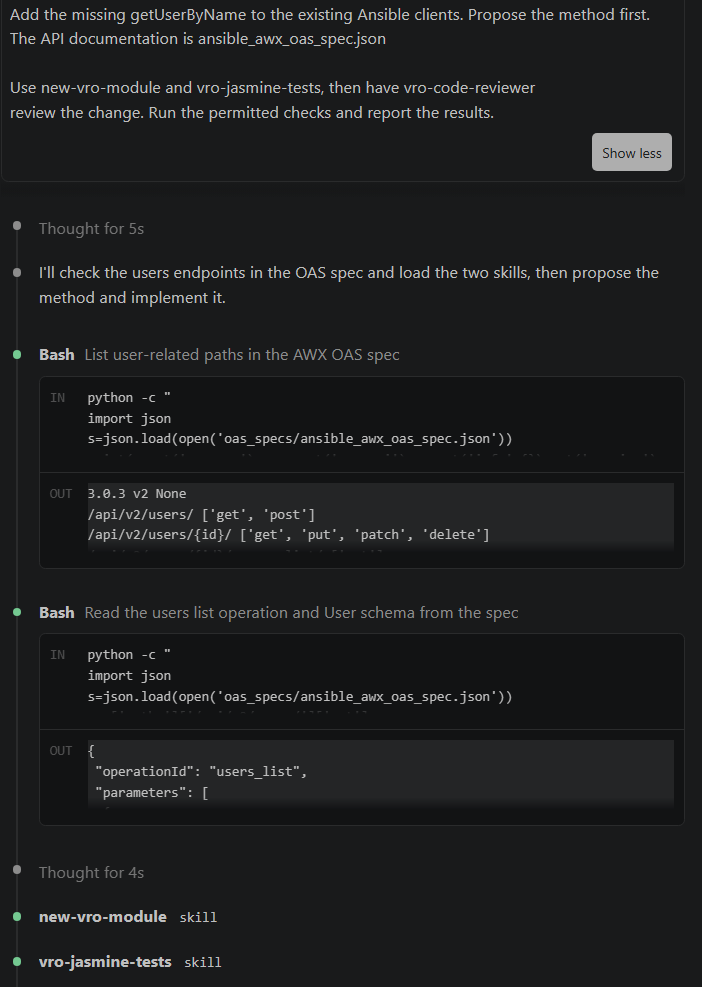
getUserByName.The prompt can stay short because the repository instructions and skills already describe the conventions, testing approach and review checks. The API documentation defines how the endpoint behaves. The prompt identifies the change and asks for a proposal before implementation.
Claude started by inspecting the users endpoints and the user schema in the supplied specification, then invoked new-vro-module and vro-jasmine-tests.
The proposed method
Claude proposed getUserByName(userName, throwOnNotFound) in AnsibleAWXOrganizationClient. Its stated approach was to use GET /api/v2/users/?search= and filter the results for an exact username match. Claude attributed that choice to the supplied specification, which it reported as documenting search without a dedicated username filter.

The proposal makes the implementation choice visible: the API search finds candidates, and the client selects the exact username. The throwOnNotFound argument also makes missing-resource behaviour part of the method’s interface. Returning an empty value and throwing an exception lead to different calling code, so that behaviour needs explicit tests.
The implementation and review summary
Claude’s completion summary reported the new method, a Jasmine spec with 11 cases, a README usage example and a changelog entry. The listed cases covered argument validation, exact matching, encoding, both not-found behaviours and an empty page envelope.
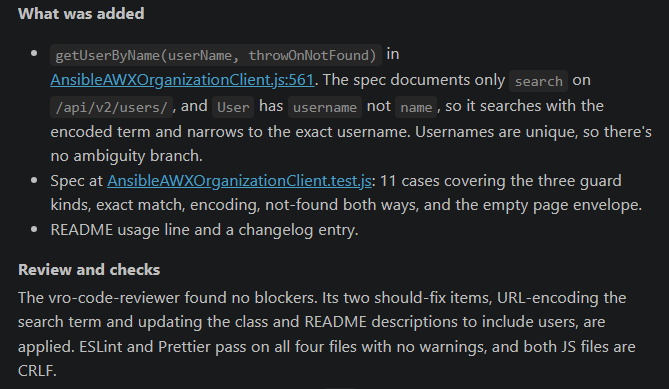
According to that summary, the reviewer found no blockers but raised two changes: URL-encode the search term and update the class and README descriptions to include users. Claude reported applying both changes. It also reported that ESLint and Prettier passed on all four files without warnings, and that both JavaScript files used CRLF endings.
The review produced specific corrections to the implementation and its documentation. The next step was to check the tests themselves.
The test output
The captured output shows node run-jasmine.js running the AnsibleAWXOrganizationClient tests. The displayed cases are marked as passing. They cover the logger name, argument validation, exact username matching, missing-user behaviour, search-term encoding and an empty page envelope.
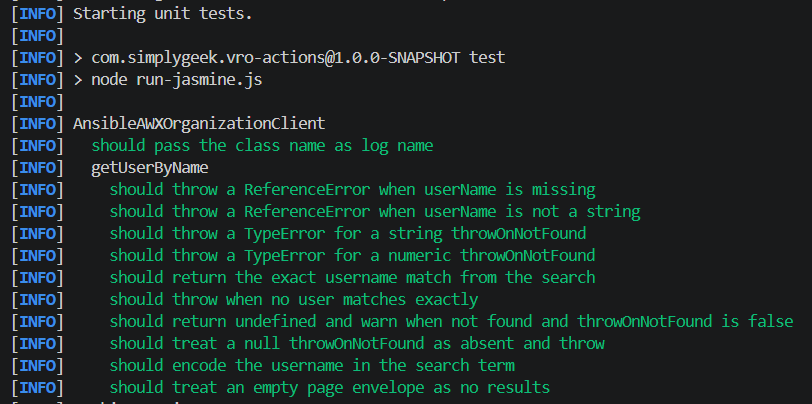
One useful case checks that a missing user returns undefined and produces a warning when throwOnNotFound is false. Another checks that null selects the default behaviour and throws. These checks make the method’s behaviour explicit for callers.
The screenshot ends before the final test summary. It provides evidence for the displayed cases, but does not establish the overall suite or Maven build result. It also does not verify the lookup against a live Ansible service.
Check conventions and behaviour separately
Each verification step answers a different question:
| Check | What it helps establish |
|---|---|
| ESLint | Whether the JavaScript meets the configured static rules |
| Prettier | Whether formatting matches the repository configuration |
| Focused code review | Whether the change follows the intended design and scope |
| Jasmine tests | Whether the tested behaviour matches the assertions in that environment |
| Execution in a suitable Orchestrator environment | Whether the integration works with the target runtime and dependencies |
Passing the first two checks does not establish the last three. A test using a mocked API response also cannot establish that a live API returns that response.
Maintain the instructions alongside the code
Skills and reviewer instructions need maintenance as the project changes. A renamed module can leave an example pointing to the wrong file. A revised validation convention can leave a template teaching the previous approach.
When reviewing these files, I would check that the referenced examples still exist and reflect the intended pattern. I would also compare shared rules with the detailed skill examples and the review checklist.
If those sources disagree, the assistant has conflicting guidance. Fixing the source of that disagreement makes the next request clearer too.
Download and adapt the reference files
Download the Claude Code reference assets (ZIP, 21 September 2026).
The archive includes the five skills, reviewer agent and CLAUDE.md, together with the lint configuration, formatting configuration, supporting scripts and referenced examples. Extract it and start with README.md.
This snapshot predates the getUserByName example and does not include that implementation or its tests.
This is a reference bundle to adapt to an existing Build Tools for VMware Aria project. It is not a complete project: the examples have dependencies outside the bundle, and no buildable Maven project is included.
The reference bundle passed lint, formatting and focused local checks. It has not been validated in a live Orchestrator environment.
These checks used the existing development tools; a fresh dependency installation has not been verified. The Jasmine screenshot shows the separate worked example.
To use it in your own repository:
- Merge the repository instructions and
.claude/files with any instructions you already maintain. - Merge the development dependencies and the ESLint and Prettier configuration. Retain your project’s existing rules where appropriate.
- Replace the namespace, module paths and tenant profile names with your own.
- Point the exemplar lists at implementations in your project. The exported examples are references, not a complete integration to deploy.
- Run the lint and formatting checks documented in the bundle’s README.
If you use the polyglot environment bundle script, the download includes a POM fragment showing how to connect it to a module. Review that fragment and its prerequisites before merging it.
Keep the instructions under version control alongside the code they describe. When a convention changes, update its example and review rule together.
Start with one recurring task
The getUserByName example brings these pieces together. The prompt names the change, the skills provide the development conventions, and the reviewer returns specific corrections. The tests then give me behaviour to inspect alongside the implementation. I still own the decision to accept the change.
For a first setup, I would start with the conventions already visible in the repository and one recurring task. An existing action, a short set of instructions and a defined review scope are enough to make the approach concrete. Additional skills can follow when another task needs its own guidance.
That is what I want from this setup: conventions I can keep alongside the code and use again when the next development task comes along.
Related articles

VCF Operations Orchestrator: Why I Write Actions and Not Workflows (Mostly)
Why I move Orchestrator logic into reusable JavaScript actions, keep workflows small and use development tools for testing and code review.

Using a Service-Oriented Architecture Approach to VCF Operations Orchestrator Development
Apply service-oriented architecture to Orchestrator integrations with reusable actions, constructor functions and prototypal inheritance.

How I Write Beautiful Code in VCF Operations Orchestrator using ESLint and Prettier
Configure ESLint and Prettier for Orchestrator JavaScript development, including command-line checks, VS Code formatting and performance tuning.
Join the discussion
Sign in with GitHub to leave a comment. View discussions on GitHub.